
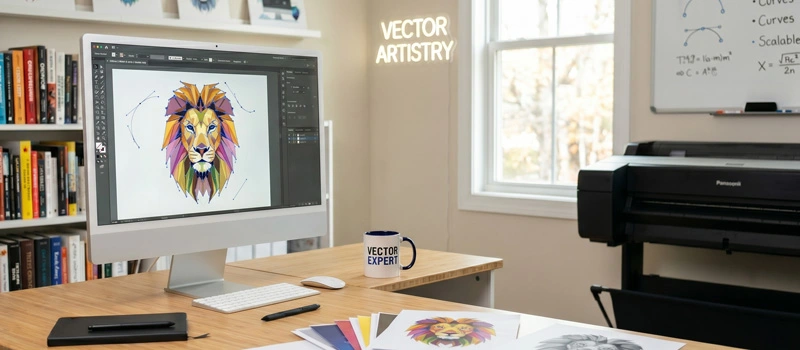
You might have noticed that drawings of professional designers always look sharp. It never loses any pixel, no matter how much you zoom in. On the other hand, regular drawing captured by phone doesn’t look crystal clear. Vector is the reason here.
Vector drawing is the first choice of Professional designers. Do you know, “What are vector drawings?” It will give your design a perfect, sharp finish. Through vector drawing, you can use your design for online platforms and printing.
What Are Vector Drawings?
A vector drawing is created by using lines, curves, and shapes. A vector-based application is used to create the vector drawing. Adobe Illustrator is the industry-standard software for vector drawings.
Adobe Illustrator, Affinity Designer 2, Inkscape, and CorelDRAW are some other professional vector software programs.
So, regular images are made of pixels. That’s why it breaks when enlarged. Vector drawings are made of paths. It stays clear in any size.
This is the core difference. Using the Vectorizing conversionmethod, you can convert your regular drawing into a vector drawing.
Why Are Vector Drawings Needed?
Vector is an inseparable part of the design industry. It directly affects your business and how people see your brand. If you print logos on t-shirts, vector is the best choice for you.
You will need vectors to create signage and banners. Also, vector drawing helps to build a brand identity.
This is the most precise way to work with screen printing. Using the wrong file format ruins the final result. If you use a blurry logo, it makes your brand look unprofessional.
Vector drawings make sure that never happens. This is not only about the looks. It’s about presenting your visuals in a professional way.
Difference Between Vector Drawings & Regular Drawings
As we have already mentioned, the main difference is the core elements. Regular drawing that you capture with your phone is a raster image. This is a pixel-based drawing.
When you zoom in on the drawing, the pixels will be visible. As vector drawing is based on paths, you can use it in any size.
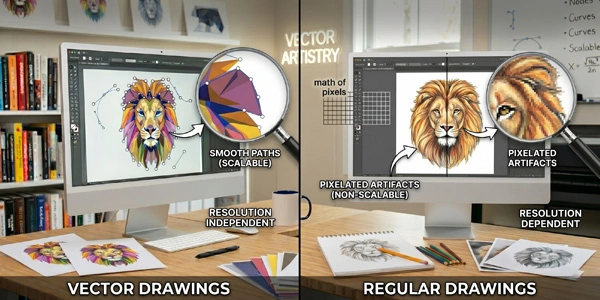
Some people keep their drawing as a JPG or PNG. Those are raster image formats. They have quality limits. Those drawings lose quality when resized. Also, your drawing will look blurry on large prints.
AI, EPS, and SVG are the file formats for vector images. You can scale infinitely. Is there any confusion about what vector drawings are? Let’s go a bit deeper.
Why Are Some Vector Drawings Low Quality?
Till now, we have told you that vector drawing has the best quality. Then, why do some vector drawings look poor? The reason is the Vector drawing conversion process. Not all vector files are created equal. A lot of vector conversions you see online are done using auto-tracing tools.
Automatic tracing converts your image instantly. But the result is rough edges, broken curves, extra unnecessary points, and poor print quality.
To get the best outcomes of the vector file, it needs to be created by an expert vector artist through a manual vectorization process. Otherwise, the quality of the vector drawing will look poor.
How To Convert Drawing into Vectors?
You might have a drawing on paper. You want to get it in vector format. How to do that? A professional designer redraws your image from scratch using precision tools.
You have to scan the drawing or capture the drawing using your smartphone. Then, get the image opened in Adobe Illustrator.
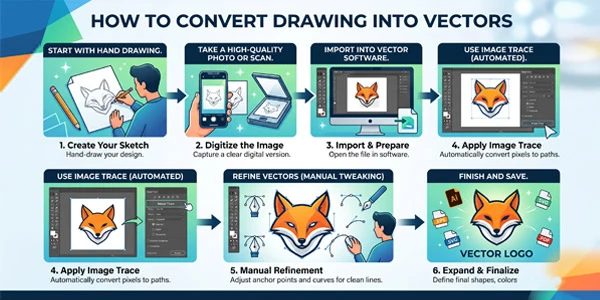
After that, you can convert it through a manual vectorization process. You have to use the combination of the pen tool, shape tool, path finder, shape builder, line tool, and pencil tool.
You have to recreate the design using shapes to get a perfect look. Also, an auto-tracing option is available in Illustrator for simple drawing.
Common Vector Drawing Mistakes
Trying to convert your drawings into vectors for the first time? There are some common mistakes that you should be careful about. First of all, always save your vector drawing in a proper vector format.
You can choose AI, EPS, and SVG. If you save your vector drawing as JPEG or PNG, it won’t look good after printing.
Another important thing, never rely on free online converters for professional use. They don’t produce professional results.
You might be thinking about getting it done by outsourcing to vector artists. Choosing the cheapest service without checking quality is another big mistake. You must check their portfolio.
How To Get Perfect Vector Drawings?
At this point, you have two options. You can try to convert it yourself if you have enough skill, expertise, and time. Otherwise, you can get it done properly by professionals. In the 2nd option, you save your time and money. So, the second option is the smarter move.
A professional manual vectorizing service ensures your file is accurate, ready for any size, and perfect for print. You can get our service for manual vector drawing conversion.
We provide 100% accurate results with unlimited revision. So, it’s guaranteed that you will get your drawing as expected.
Sum Up
Hopefully, your concept is clear about what are vector drawing. The drawing scanned from paper or an image is a raster format. You already know the downside of those raster-based drawings.
Vector drawing is the right format to showcase your creativity on professional platforms. They’re a must-have if you care about long-term use.
Before you use your drawing on professional platforms, make sure it’s done right. You can convert your drawing into a vector to see the difference a professional vector makes. If you get it done by our expert vector designers, you will be satisfied with the results.
FAQ’s
What file formats are vectors?
The most popular vector formats are AI, EPS, SVG, and vector-based PDF. You can use any of those formats to save your vector drawing.
Can you convert a JPG Drawing to a vector?
We have a professional team to convert a JPG drawing to a vector. We will do the conversion without losing any details. It’s a hand-drawn process.
How much does vector drawing conversion cost?
Our service pricing starts at $8. The final price will depend on image complexity and image quantity. Send is the image file so that we can inform you of the actual price.
Can you convert vector drawings from scanned images?
We accept scanned images of drawings to convert them into vectors. Ask for a quote now and send us the scanned images.